












An inventory you can actually use
Installed packages, services, open ports, users, scheduled tasks, configuration drift and the dependency SBOM — collected from your machine and your repositories in one pass.
AI employees
The role that reads and explains: what is vulnerable on your machine, which version fixes it, what to treat first — in plain language, before anything is applied.
What it does
Inventory, match, rank and explain. The analyst stops at the report.
The AI cybersecurity analyst answers the question every small team postpones: what is actually exposed on this machine, and what matters first? It holds the recurring reading work — inventory the machine and the repositories, compare the versions found against published advisories, rank the findings and explain them in plain language.
The analyst is deliberately read-only. It reports; it does not apply. When you decide something must be fixed, the engineer role takes over — a reasoned proposal, a snapshot, the change applied with your approval and a post-check. Same licence, two roles, one loop.
What you get
A ranked report you can read, share and act on.
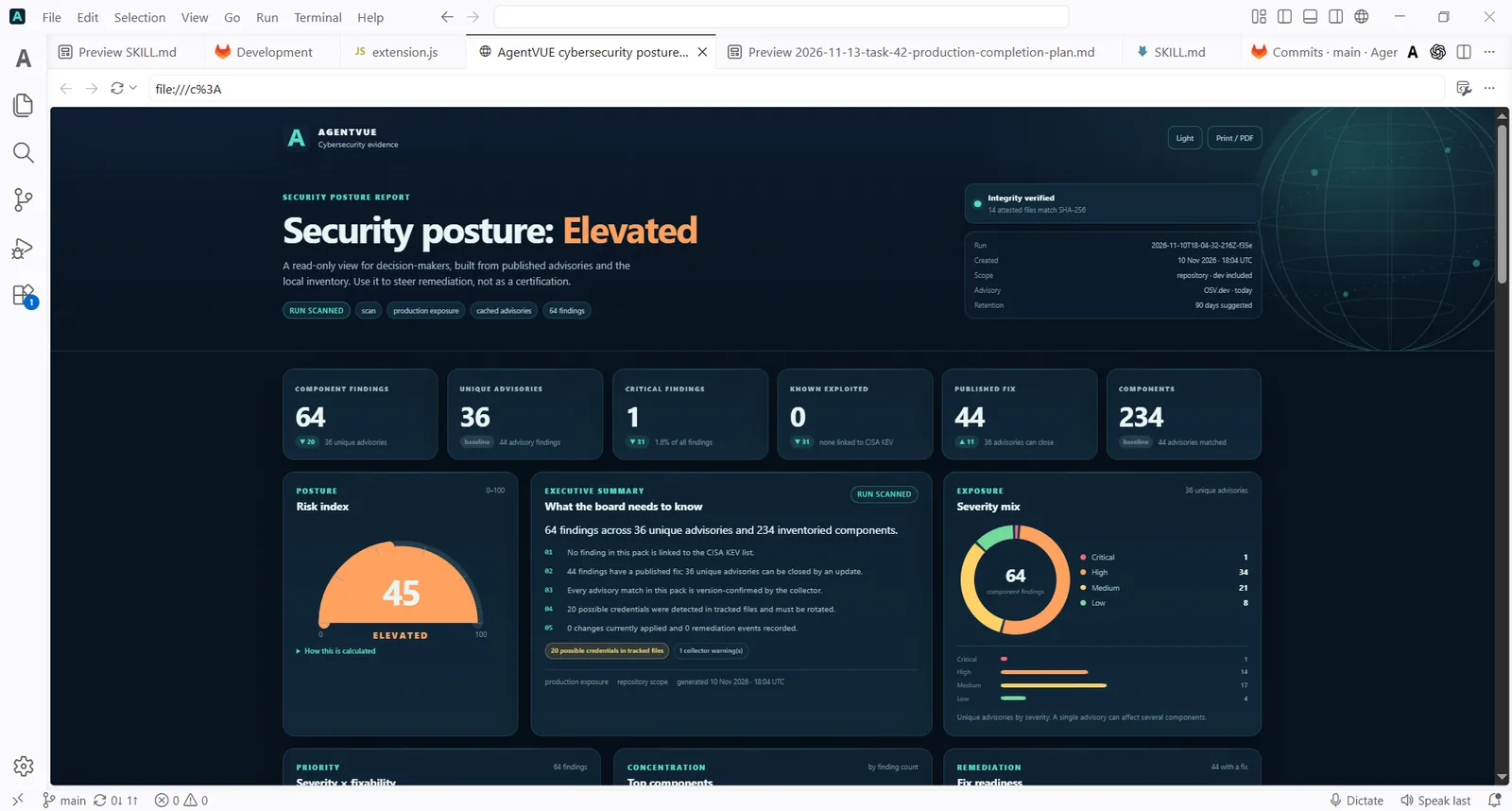
Installed packages, services, open ports, users, scheduled tasks, configuration drift and the dependency SBOM — collected from your machine and your repositories in one pass.
Versions found are compared against published advisories: npm, PyPI, vendor advisories and CISA alerts. Recent example of the newsflow it keeps up with: Node.js shipped security releases on 21 October 2026 (26.12.1, 24.22.1, 22.23.4), including a Brotli decoder out-of-bounds write enabling code execution (CVE-2026-111497) and two TLS certificate hostname bypasses; CISA KEV gained six new entries on 20 October 2026, including four Plex CVEs.
For each finding: what it is, why it matters for this machine, which version fixes it and what to treat first. Short sentences, concrete nouns — a report a non-specialist can act on.
The analyst stops at the report. Nothing changes on your machine from its output until you — or the engineer role, with your approval — decide to act.
In the app
Severity, affected version and a plain-language explanation on one page.
How a run goes
The analyst never applies a change.
The workstation maps your machine and your repositories: installed packages, services, open ports, users, scheduled tasks, configuration drift, dependency SBOM.
Collected versions are compared against published advisories at run time. What is exposed and internet-facing comes first; the internal nice-to-have comes later.
The report waits for you. You read, you decide, and fixes — if you want them applied — go through the engineer role with your approval.
A dated local export, ready for a client questionnaire or an internal review. Nothing leaves the machine unless you export it.
Control
Fixes go through the engineer role.
Where you stay in control
The analyst inventories, matches and explains. Fixes go through the engineer role, with your approval.
It reports. It does not apply.
Start here
Pick your plan, install, and let the first inventory tell you what needs attention.
Built with AgentVUE
The same agents that run the role run AgentVUE. You are buying the machine that already does the work.
See the showcase
Keep reading
The role in context — same licence, same machine.
Questions
The scope, the report, the approvals and the price.
Yes, by design. It inventories, matches and explains; it applies nothing. Fixes go through the engineer role, and only with your approval.
Your machine and your repositories: installed packages, running services, open ports, users, scheduled tasks, configuration drift and the dependency SBOM. The inventory is collected on your disk, in one pass.
Findings are matched against published advisories when the run executes — npm and PyPI advisories, vendor advisories, CISA alerts and KEV entries. The comparison runs against your real installed versions, not a self-declared list.
The analyst reads and explains; the engineer prepares and applies. The analyst's report is the input to the engineer's fix — and both run on the same machine under the same licence.
That is the job. Each finding states what it is, why it matters for this machine, which version fixes it and what to treat first — in plain language, without a jargon wall.
One licence covers the whole workstation: Pro €49, Max €99, Ultra €199 per month billed yearly, or €33/€66/€123 per month with three years prepaid and one year free. The details are on the pricing page.
Next step
Pick your plan, install, and let the first inventory tell you what actually needs attention.